Guide · OwnFi 2.0 Coming soon
How to use your cash plan
Safe to Spend tells you what you can spend today. Your cash plan answers the next question: what happens to the rest of your cash? It keeps aside what the next 30 days need, then shares out whatever is left across the priorities you choose, in your order. Every figure is arithmetic on your own balances and answers, worked out on your phone. It never chooses a priority, an investment or an amount for you.
Coming soon: the cash plan arrives in OwnFi 2.0, which is on its way to the App Store and Google Play. The screenshots on this page use the app's sample data, so the numbers are fictional.
Where to find it
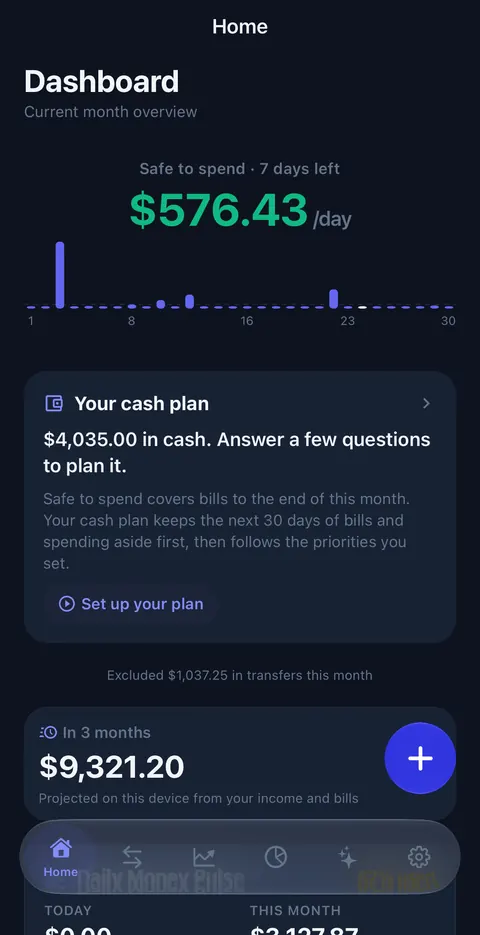
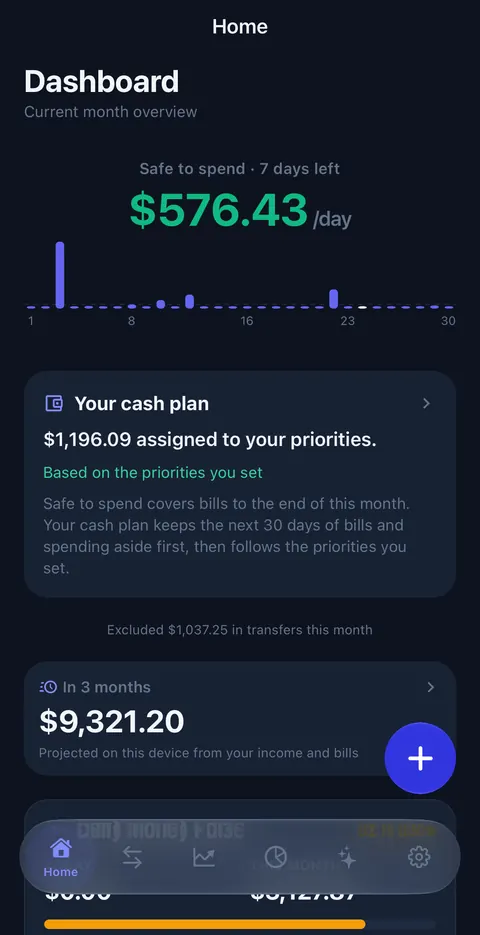
- Home: the Your cash plan card sits under Safe to Spend. Before you set it up it shows your cash and a Set up your plan button; afterwards it shows how much is assigned to your priorities. Tap it to open the plan.
- Advisor: tap Plan my cash, or type it. The 💰 Plan my cash suggestions list every question on this page.
- Try it without your own data: choose Explore with sample data on the first screen. Everything below works on the sample month, and one tap wipes it.
The eight questions
The plan asks one question at a time. Optional ones have a Skip button, and every answer can be changed later.
| # | Question | What to enter | Why it asks |
|---|---|---|---|
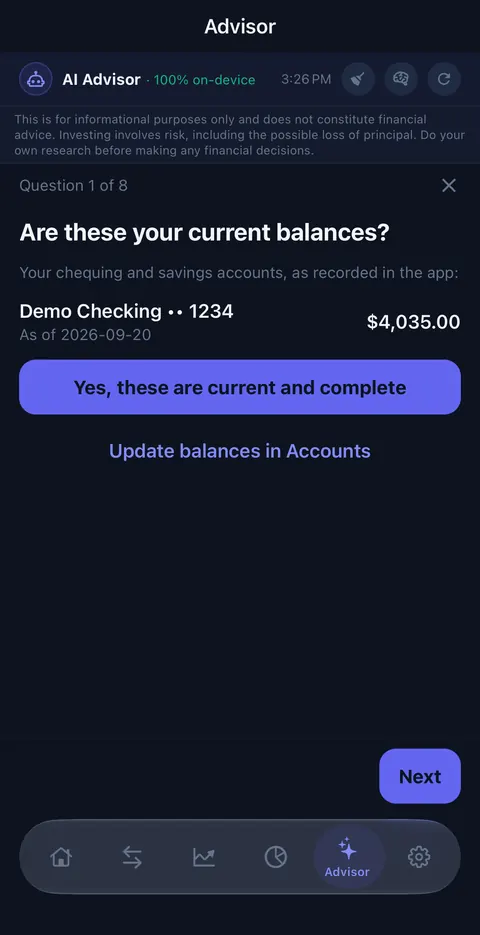
| 1 | Are these your current balances? | Check the chequing and savings balances shown, then tap Yes, these are current and complete, or update them in Accounts. | OwnFi has no bank connection, so only balances you confirm are counted. If a balance changes later, it asks again. |
| 2 | How much do you keep in chequing at minimum? | A buffer, such as $300. Leave it at 0 if you don't keep one. | It is kept on top of the next 30 days of bills and spending. |
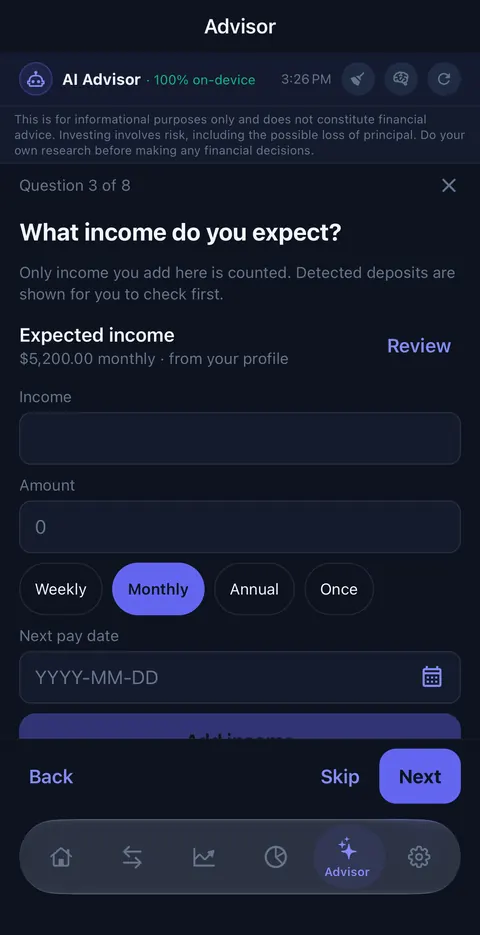
| 3 | What income do you expect? | Each income: amount, how often (weekly, monthly, annual or once) and the next pay date. | Only income you add is counted. Deposits found in your statements are shown for you to check first, never assumed. |
| 4 | Any one-off expenses coming up? | A car repair, a trip, a tax bill, with an amount and a date. Optional. | Regular bills are already counted; these are the costs the app can't see coming. |
| 5 | Emergency savings | Your target, and how much of it is already sitting in your accounts. | The emergency target can be one of your priorities. |
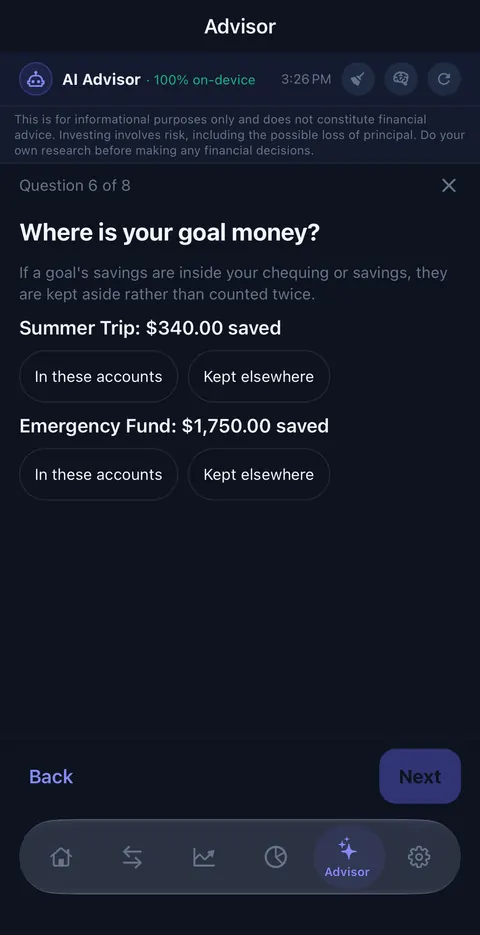
| 6 | Where is your goal money? | For each goal: In these accounts or Kept elsewhere. | Goal savings inside your chequing or savings are kept aside, so the same money is not counted twice. |
| 7 | Anything else already set aside? | Money in these accounts that is already promised: a deposit you're holding, a tax payment, a gift. Optional. | It comes off before your priorities. |
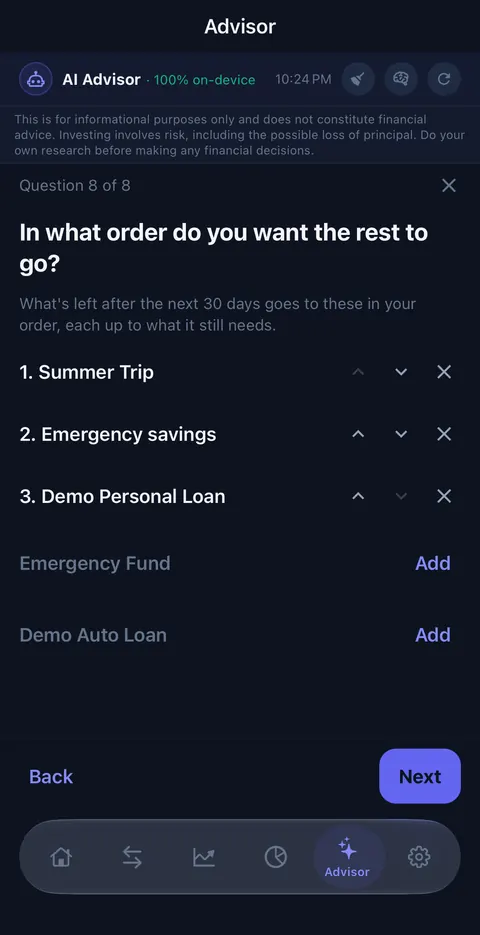
| 8 | In what order do you want the rest to go? | Add the priorities you want (emergency savings, goals, debts) and move them up or down. | What is left is shared out in this order, each up to what it still needs. |
Reading your plan
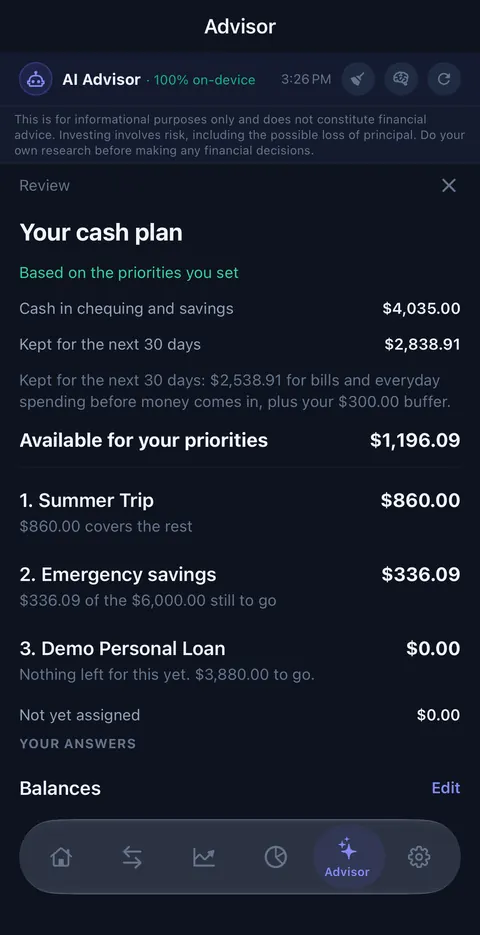
After the last question you see the result, with your answers and an Edit link beside each one. Save preferences keeps it. Here is the sample month, line by line:
| Line | Sample | What it means |
|---|---|---|
| Cash in chequing and savings | $4,035.00 | The balances you confirmed in question 1, in your home currency. |
| Kept for the next 30 days | $2,838.91 | The most your bills, card payments, debt payments and everyday spending run ahead of your confirmed income at any point in the next 30 days ($2,538.91 here), plus your chequing minimum ($300). If your income always arrives first, only the minimum is kept. |
| Already set aside | none here | Emergency savings already in your accounts, goal money held in them, and anything from question 7. Shown only when there is some. |
| Available for your priorities | $1,196.09 | Cash, less what is kept for 30 days, less what is set aside. |
| 1. Summer Trip | $860.00 | “$860.00 covers the rest”: the whole amount the goal still needed. |
| 2. Emergency savings | $336.09 | What was left after priority 1. “$336.09 of the $6,000.00 still to go”. |
| 3. Demo Personal Loan | $0.00 | “Nothing left for this yet”: the money ran out before it. Moving it up the order changes that. |
| Not yet assigned | $0.00 | Anything left after every priority is covered. It stays yours; the plan just hasn't been told where it goes. |
When the plan looks different
- “Based on the priorities you set”: the normal state. Your balances are confirmed and current.
- “A few answers are still needed”: a balance hasn't been confirmed, or something the plan needs is missing. The card tells you which, for example “Confirm your balances are current and include all your cash accounts.”
- “An illustration: some balances are out of date”: a balance is more than a month old, or its date is unknown. Update the balance or import a recent statement. A balance more than a week old is flagged but still counted.
- An account in another currency with no exchange rate is named and left out, never counted as zero. Refresh rates in Currency settings.
- “Your cash is … short of the next 30 days of bills and spending”: nothing is available for priorities until more money comes in.
- “These answers were updated on another device in your family group”: with family sync on, someone changed the shared answers. Open the plan to review them.
Cash plan or Safe to Spend?
They are different numbers on purpose. Safe to Spend covers your bills to the end of this month and turns what is left into a daily amount ($576.43 a day in the sample). The cash plan looks 30 days ahead from today, counts only the income you confirmed, and then follows your priorities. Use Safe to Spend for today's spending; use the cash plan to decide where saved-up cash goes.
What to ask the Advisor
Type these or tap them under 💰 Plan my cash. Every answer comes from the same saved plan the Home card shows, and works without an AI model installed.
| Ask | What you get |
|---|---|
| “Plan my cash” | Opens the questions, or your saved plan to edit. |
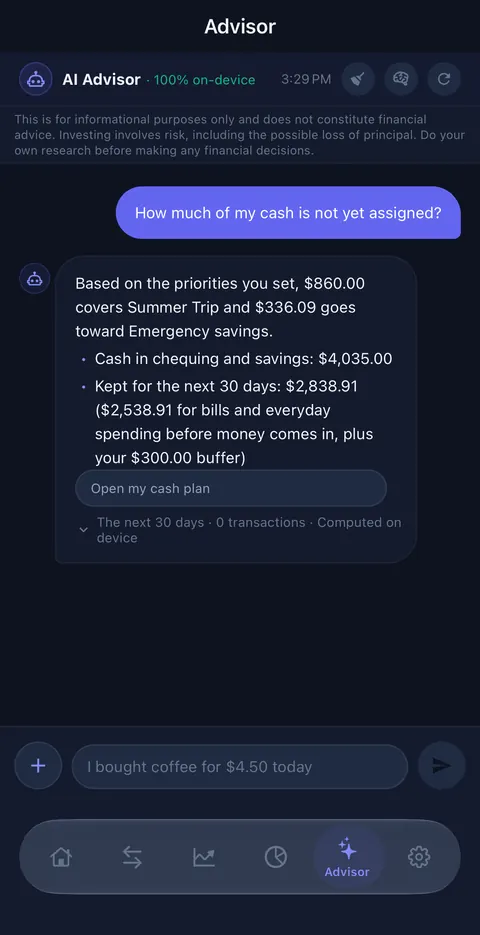
| “Show me my cash plan”, “How much of my cash is not yet assigned?” | A short answer in the chat with the key figures and an Open my cash plan button. The amounts are never reworded by a model, so they can't be swapped between priorities. |
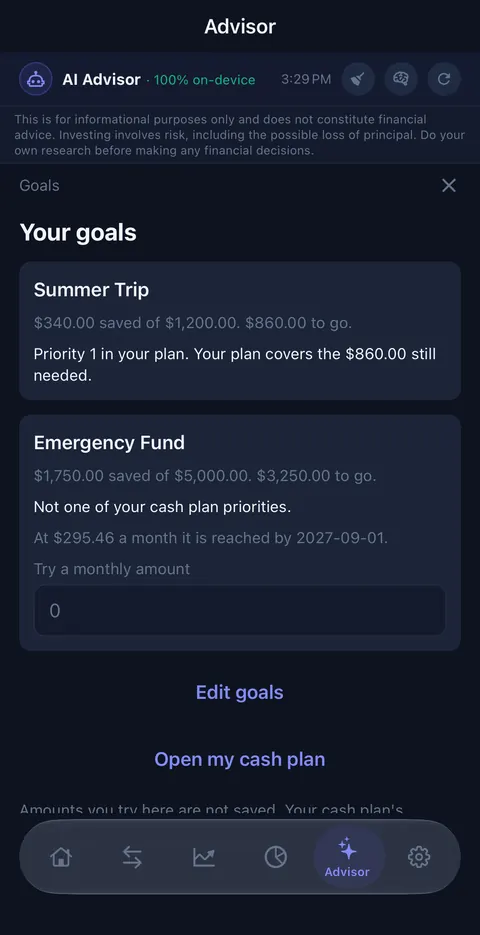
| “Plan my goals” | Each goal's progress and where it sits in your plan. Type a monthly amount to see when a goal would be reached. |
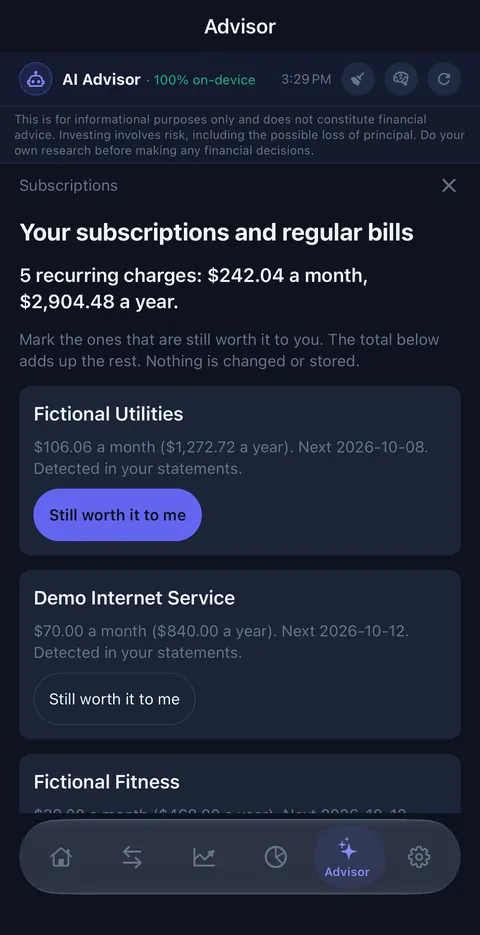
| “Review my subscriptions” | Every recurring charge with its monthly and yearly cost. Tap Still worth it to me on the ones you keep, and the total shows what the rest cost. Nothing is cancelled. |
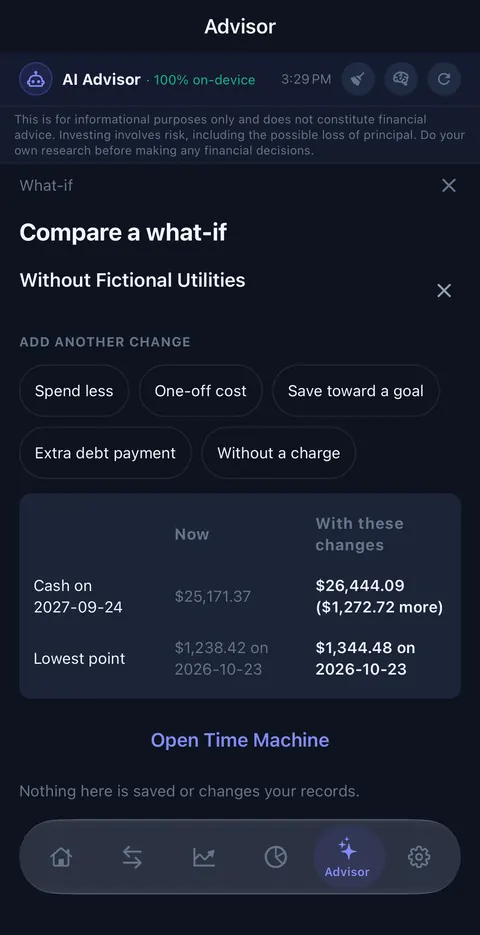
| “Compare a what-if” | Add changes (spend less in a category, a one-off cost, saving toward a goal, an extra debt payment, a charge you stop) and compare cash in a year and your lowest point against your current path. |
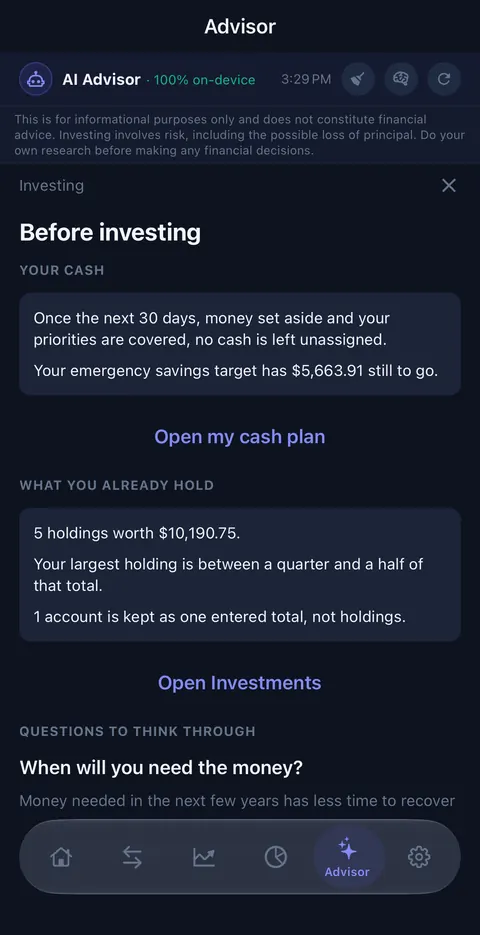
| “Am I ready to invest?” | The cash left after your plan, how far your emergency savings still have to go, what you already hold, and three questions to think through: when you will need the money, how a fall in value would affect you, and how quickly you could get it back. |
| “How does the cash plan work?” | An explanation of the method, like this page, alongside your own numbers. |
What it does not do
- It does not recommend priorities, investments, securities or amounts. The investing view never names a ticker; for advice about your situation, speak with a registered adviser.
- It does not send anything anywhere. The plan is worked out on the phone; there is no OwnFi server.
- What-ifs, goal amounts you try and subscription choices are not saved and don't change your records. OwnFi never cancels a subscription.
- It does not count income you haven't confirmed, or guess a balance it can't read.
Changing or clearing your plan
Open the plan from the Home card or with Plan my cash, then use Edit beside any answer and save again. Clear my plan removes the answers and your balance confirmation. With family sync on, your answers are shared with your family group, while each person confirms balances on their own phone; a family member who still has the answers brings them back at the next sync. Your answers are also included in your encrypted backup. See the Privacy Policy.
Questions
Is the cash plan financial advice?
No. It is arithmetic on your own balances and answers. You choose the priorities and their order; OwnFi adds up what the next 30 days need and shares out what is left in that order. It never picks a priority, an investment or an amount for you.
Why is Available for your priorities different from Safe to Spend?
They answer different questions. Safe to Spend covers bills to the end of this month and turns the rest into a daily amount. The cash plan looks 30 days ahead from today, counts only income you confirmed, and then follows your priorities.
Why does the plan say it is an illustration?
A balance is more than a month old, or its date is unknown. Update the balance or import a recent statement and the plan becomes current again. Balances more than a week old are flagged but still counted.
Why did the plan ask its questions again?
Your balances changed after you confirmed them, a new cash account appeared, or your home currency changed. The plan asks you to confirm again so it never works from balances you have not checked.
Does anything leave my phone?
No. The plan is worked out on the device and nothing goes to an OwnFi server. If you use family sync, your answers travel to your family's devices in the same encrypted package as your other settings; your balance confirmation stays on your own phone.
Do what-ifs or subscription choices change my records?
No. Nothing in the goals view, the subscription review, the what-if comparison or the investing view is saved or changes your records, and OwnFi never cancels a subscription.
About OwnFi
OwnFi is a free budgeting app that imports your bank statements instead of logging into your bank. Nothing leaves your phone. Free on iPhone and Android, with a sample-data mode so you can look before importing anything. See everything it does or read the support page.